What Are Data Center Liquid Cooling Systems and How Do They Work
Modern data centers are handling increasingly powerful servers, AI accelerators, GPUs, and high-performance computing workloads.
As computing density increases, conventional air-based cooling can face limitations in removing heat from densely packed equipment. Data Center Liquid Cooling Systems use liquid as the primary heat-transfer medium to remove heat more efficiently from high-density computing infrastructure.
Liquid cooling can be implemented in several ways, including direct-to-chip cooling, rear-door heat exchangers, immersion cooling, and hybrid configurations. The appropriate approach depends on rack density, server design, facility infrastructure, coolant characteristics, and operational requirements.
What Are Data Center Liquid Cooling Systems?
Data Center Liquid Cooling Systems are thermal management systems that use a liquid coolant to transfer heat away from servers and other high-performance computing equipment.
Instead of relying entirely on room air to carry heat away from electronic components, liquid cooling places the heat-transfer process closer to the source of heat.
A typical system can include:
- Cold plates or cooling interfaces
- Coolant distribution units
- Pumps
- Heat exchangers
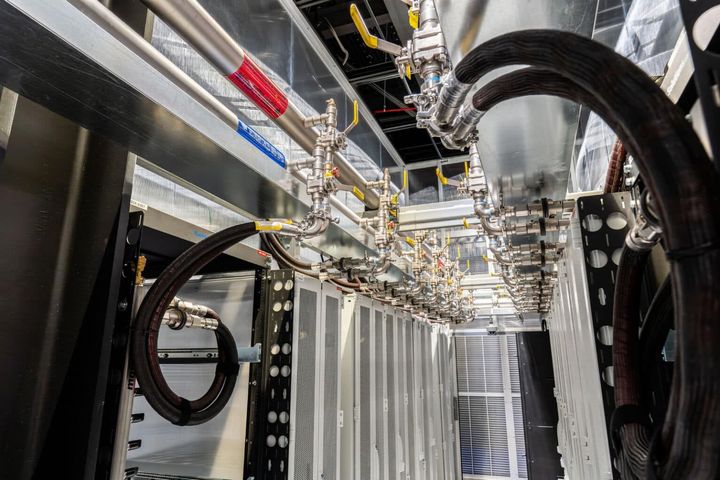
- Coolant supply and return loops
- Monitoring sensors
- Control systems
- Facility cooling infrastructure
The liquid absorbs heat from computing components and transfers it through a controlled loop toward a heat-rejection system.
Why Is Liquid Cooling Important for Data Centers?
AI computing, high-performance computing, cloud infrastructure, and other intensive workloads can produce substantial heat within a relatively small physical footprint.
Traditional air cooling uses fans and airflow to move heat from servers into the surrounding environment. As rack power density increases, managing airflow and maintaining appropriate temperatures can become more challenging.
Liquid cooling provides several potential advantages:
- Direct heat capture
- Efficient heat transfer
- Support for high-density computing
- Reduced dependence on large airflow volumes
- More centralized thermal management
- Compatibility with advanced computing infrastructure
Liquid cooling does not necessarily replace air cooling throughout an entire facility. Many data centers use hybrid systems in which liquid cooling handles high-density components while air cooling manages other equipment.
How Do Data Center Liquid Cooling Systems Work?
The basic process involves capturing heat, transferring it through a liquid loop, and rejecting that heat through facility cooling infrastructure.
1. Heat Generation
Processors, GPUs, memory, networking equipment, and other electronic components generate heat during operation.
The highest thermal loads are often concentrated around processors and accelerators.
2. Heat Transfer to the Coolant
A cooling interface is positioned close to the heat-producing component.
In direct-to-chip systems, a cold plate is mounted directly on a processor or GPU. Coolant flows through the cold plate and absorbs heat.
3. Coolant Circulation
A pump moves the heated coolant away from the server and toward a coolant distribution or heat-exchange system.
The circulation loop is designed to maintain the required flow rate and temperature.
4. Heat Exchange
The heated liquid transfers its thermal energy to another cooling loop through a heat exchanger.
Depending on the facility architecture, heat may eventually be rejected through chillers, dry coolers, cooling towers, or other heat-rejection equipment.
5. Coolant Return
After losing heat, the coolant returns to the server-side loop.
The cycle continues as long as the computing equipment operates.
Major Types of Data Center Liquid Cooling Systems
Direct-to-Chip Cooling
Direct-to-chip cooling uses cold plates attached directly to processors or other high-heat components.
A typical cold plate contains internal channels through which coolant flows.
Basic process:
- Coolant enters the cold plate.
- Heat transfers from the chip to the cold plate.
- Coolant absorbs the heat.
- Heated coolant leaves the server.
- Heat is transferred to the facility cooling loop.
This approach is particularly relevant to high-density servers and accelerator-based computing.
Immersion Cooling
Immersion cooling places electronic components or complete server systems in a specially designed dielectric liquid.
The liquid directly surrounds heat-producing components.
There are two broad approaches:
- Single-phase immersion: The coolant remains liquid during operation.
- Two-phase immersion: The coolant changes phase as it absorbs heat and later condenses back into liquid.
Immersion systems require compatible hardware, fluid management, containment, and specialized maintenance procedures.
Rear-Door Heat Exchangers
A rear-door heat exchanger is installed at the back of a server rack.
Warm air leaving the servers passes through the heat exchanger, where liquid removes heat before the air returns to the data center environment.
This approach can provide liquid-assisted cooling without requiring coolant connections directly to individual processors.
Hybrid Liquid Cooling
Hybrid systems combine liquid and air cooling.
For example, direct-to-chip cooling can handle high-power CPUs and GPUs while conventional airflow continues to cool memory, storage, networking components, and other equipment.
Hybrid configurations can be useful when only certain racks or components have exceptionally high thermal loads.
Key Components of a Liquid Cooling System
| Component | Primary Function |
|---|---|
| Cold plate | Transfers heat from chips to coolant |
| Pump | Circulates coolant |
| Coolant distribution unit | Controls and distributes coolant |
| Heat exchanger | Transfers heat between loops |
| Manifold | Routes coolant to multiple servers |
| Sensors | Monitor temperature, pressure, and flow |
| Control system | Regulates cooling operation |
| Facility heat rejection | Removes heat from the cooling loop |
Direct-to-Chip vs. Immersion Cooling
| Feature | Direct-to-Chip | Immersion |
|---|---|---|
| Cooling method | Cold plates | Components surrounded by liquid |
| Server modification | Moderate | Often more extensive |
| Target application | High-density CPUs/GPUs | High-density computing |
| Air cooling requirement | May remain for other components | Can be significantly reduced |
| Maintenance approach | Similar to liquid-loop infrastructure | Requires specialized fluid handling |
| Deployment flexibility | Can integrate with existing racks | Often requires dedicated infrastructure |
The best configuration depends on the server hardware, rack density, facility design, and operational requirements.
What Coolants Are Used?
Liquid cooling systems can use different types of fluids depending on the technology.
Water-Based Coolants
Water has strong thermal properties and is commonly used in closed-loop cooling infrastructure. It can be treated or combined with additives to address corrosion, biological growth, and other operational considerations.
Dielectric Fluids
Immersion systems generally require electrically non-conductive fluids so that electronic components can operate while immersed.
Engineered Cooling Fluids
Some specialized systems use engineered fluids designed around particular thermal, electrical, chemical, or environmental requirements.
Coolant selection should consider thermal performance, material compatibility, stability, maintenance, safety, and system design.
Benefits of Data Center Liquid Cooling Systems
High-Density Heat Management
Liquid cooling can capture heat close to high-power processors, making it suitable for dense computing environments.
Efficient Heat Transfer
Liquids can transfer substantial amounts of heat through relatively compact cooling interfaces and loops.
Support for AI Infrastructure
AI servers and GPU clusters can produce high thermal loads. Liquid cooling provides an approach for managing these loads within increasingly dense racks.
Reduced Airflow Dependence
When liquid removes a significant portion of processor heat, the facility may require less airflow for those components.
Potential Infrastructure Flexibility
Depending on the configuration, liquid cooling can be deployed at the rack, server, or component level.
Challenges of Liquid Cooling
Infrastructure Complexity
Liquid cooling introduces pumps, piping, manifolds, heat exchangers, monitoring systems, and additional control requirements.
Leakage Management
Liquid systems require appropriate containment, connection design, monitoring, and maintenance procedures to reduce leakage risks.
Hardware Compatibility
Not every server is designed for the same liquid cooling architecture.
Maintenance Requirements
Coolant quality, filters, pumps, valves, connectors, and heat exchangers require appropriate monitoring and maintenance.
Facility Integration
The server-side cooling loop must work effectively with the building's heat-rejection infrastructure.
Factors to Consider When Designing Liquid Cooling
Rack Power Density
Higher rack power levels can increase the need for liquid-based heat removal.
Server Architecture
The type of processors, GPUs, accelerators, memory, and networking equipment affects the cooling approach.
Existing Cooling Infrastructure
A facility may need to integrate liquid cooling with existing chilled-water or heat-rejection systems.
Coolant Distribution
The system should provide appropriate flow and temperature to each cooling load.
Monitoring
Sensors can track:
- Supply temperature
- Return temperature
- Flow rate
- Pressure
- Leak detection
- Coolant condition
Scalability
The cooling architecture should accommodate future increases in computing density where practical.
Best Practices for Data Center Liquid Cooling
- Match the cooling architecture to the server thermal design.
- Evaluate rack power density before selecting the cooling method.
- Use appropriate coolant and compatible materials.
- Monitor supply and return temperatures continuously.
- Monitor coolant flow and pressure.
- Implement leak detection where appropriate.
- Maintain pumps, filters, valves, and heat exchangers regularly.
- Design clear coolant distribution and isolation procedures.
- Integrate liquid cooling with the facility heat-rejection system.
- Plan for future computing-density requirements.
Applications of Data Center Liquid Cooling
Liquid cooling is increasingly relevant across several high-performance computing environments.
AI Data Centers
GPU-intensive AI workloads can produce significant heat within compact server configurations.
High-Performance Computing
Scientific computing and simulation systems can require high computational density and substantial thermal management.
Cloud Data Centers
Large-scale cloud facilities can use liquid cooling for selected high-density computing clusters.
Edge Computing
Some specialized edge environments can use compact liquid cooling architectures where high computing performance is required within limited physical space.
Research Computing
Universities, laboratories, and research facilities can use liquid cooling for advanced computing systems with high thermal loads.
Frequently Asked Questions
What are Data Center Liquid Cooling Systems?
Data Center Liquid Cooling Systems use liquid coolant to capture and transfer heat from servers, processors, GPUs, or other high-density computing equipment.
How does direct-to-chip cooling work?
Direct-to-chip cooling uses cold plates attached to high-heat components. Coolant flows through the cold plates, absorbs heat from the components, and transfers that heat toward a heat exchanger or facility cooling loop.
What is immersion cooling in a data center?
Immersion cooling places electronic components or servers in a dielectric liquid that absorbs heat directly from the equipment.
Is liquid cooling better than air cooling for data centers?
Liquid and air cooling address different thermal requirements. Liquid cooling can be particularly useful for high-density computing, while air cooling remains practical for many lower-density loads and supporting equipment.
What equipment is required for data center liquid cooling?
Typical systems can include cold plates, pumps, manifolds, coolant distribution units, heat exchangers, sensors, control systems, piping, and facility-level heat-rejection equipment.
Conclusion
Data Center Liquid Cooling Systems provide a way to manage the increasing thermal demands of modern computing infrastructure. By transferring heat through liquid rather than relying entirely on room airflow, these systems can support high-density servers, GPUs, AI infrastructure, and high-performance computing environments.
Direct-to-chip cooling, immersion cooling, rear-door heat exchangers, and hybrid configurations each use different approaches to move heat away from computing equipment. The appropriate architecture depends on rack density, hardware design, facility infrastructure, coolant requirements, and operational considerations.
As computing systems continue to become more powerful and physically dense, liquid cooling is an increasingly important component of data center thermal management. A successful implementation requires coordinated server design, coolant distribution, heat exchange, monitoring, facility integration, and ongoing maintenance.